

✋ New to InterLink?
Before setting up your wallet, start here first: 🔗 InterLink Starter Guide.
Become a qualified member of the verified digital economy built on human participation.
You are diligently pressing that mining button every day, right?
But here is a hard truth: if you haven’t activated your ITLX Wallet yet, you are missing the most important part of the entire ecosystem.
Let me explain it in the simplest way:
Activating your wallet = Unlocking the REAL InterLink
Not just mining numbers — but owning verified assets and accessing a global exchange that never closes.
Today, I’ll break down why you need this “Super Wallet” NOW and how to set it up in 5 minutes.
1️⃣ Why Activate the ITLX Wallet Right Now?
The ITLX Wallet isn’t just a place to store coins. It is a Non-Custodial DEX — and it is becoming something much larger.
Pro Trading Access 📈 Spot & Futures trading with deep liquidity and a robust matching engine.
Real-World Assets (RWA) 💰 Trade U.S. stocks and Gold directly on-chain — NVDA, META, GOOGL.
Multi-chain, One Interface 🧬 8 chains unified in one app. Swap, bridge, and cross-chain — what previously required multiple applications now takes seconds.
Coming Next: InterLink Visa Card 💳 Launching with Version 5.0 as a virtual card integrated with the ITLX Super Wallet. Accepted at 50M+ merchants across 170+ countries. ITL and ITLG payment integration to follow.
Think of the wallet as your passport.
Without it, your mined points can never become ITL. And without ITL in a Visa Card, InterLink stays on-chain. The goal is to put it in your pocket.
2️⃣ What Benefits Do You Get? (Instant + Long-Term)
Immediate 🎁
+0.2 HCS instantly — equivalent to 100 mining sessions, just by entering a referral code.
Verified Status (Anti-Burn) — ITLG not linked to a wallet risks being burned in future snapshots.
Revenue — Set your fee structure and start earning from referrals.
Long-Term 🎁
Higher Conversion — A higher HCS score means a better $ITLG to $ITL conversion rate.
Visa Card Readiness — When ITL and ITLG enter the Visa Card’s payment infrastructure, wallet-connected users transact at 50M+ merchants globally. You cannot use what you haven’t set up.
BusinessToken Ecosystem — InterLink is standardizing how real-world businesses enter on-chain economies. The ITLX Wallet is where these assets will flow.
The ITLX Wallet is no longer just a crypto wallet.
It is where on-chain trading, real-world business assets, and Visa-powered payments converge. Position yourself now — not later.
3️⃣ How to Activate (Simple Steps)
- Install the ITLX Wallet -
🔸 Step 1: Create & Connect
![Still mining… but haven’t tapped [Wallet]?](https://substackcdn.com/image/fetch/$s_!uIad!,f_auto,q_auto:good,fl_progressive:steep/https%3A%2F%2Fsubstack-post-media.s3.amazonaws.com%2Fpublic%2Fimages%2F0b0989c9-b2c3-4865-baff-90a7612db2ce_1079x773.png "Still mining… but haven’t tapped [Wallet]?")
Select [Wallet] tab.
Tap [Create New Wallet] and set a 6-digit password (treat it like a bank PIN).
Connect Your Interlink ID
Tap the Profile Icon 👤 -> [Connect Now].
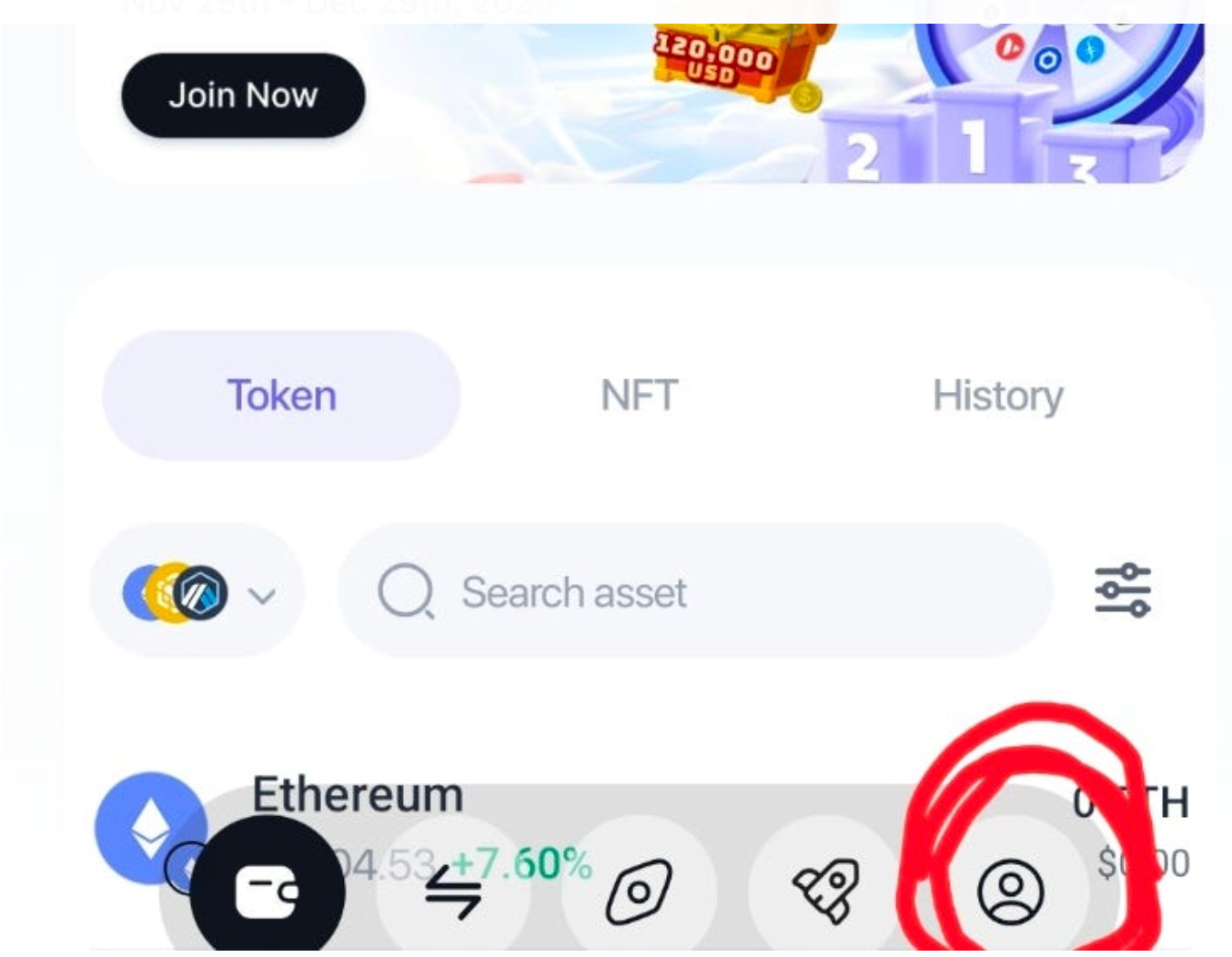
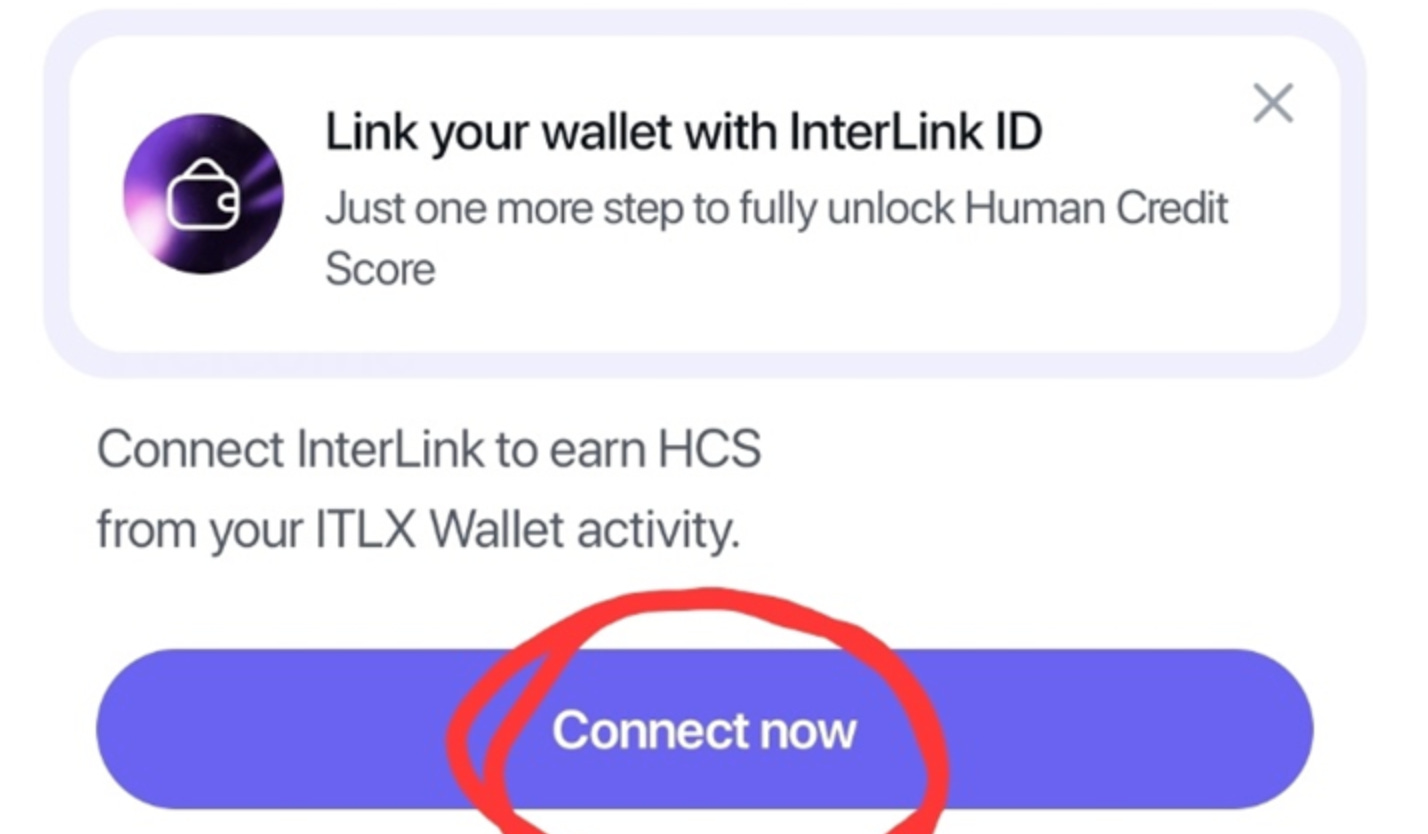
🔸 Step 2: Enter Referral Code (+0.2 HCS)
Go to your Profile 👤 again -> Scroll down -> Invitation Code box.
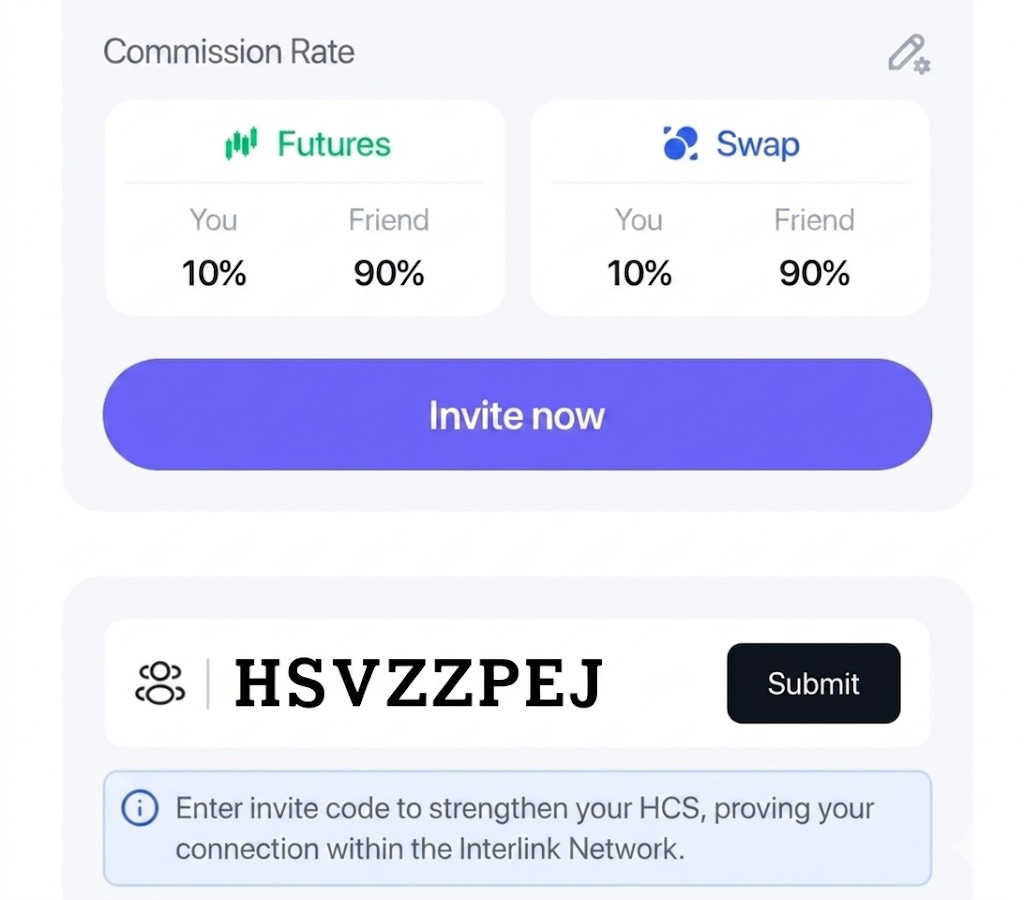
🙅 Don’t skip this!
Leaving it blank means 0 points. Entering the code gives you +0.2 HCS instantly.
I’ve set the commission rate to 90% for YOU and 10% for me. This is my investment in your success. Let’s win together.
Wallet Invitation Code: HSVZZPEJ
🔸 Step 3: Set Your Commission Rate
Here is a quick strategy most people miss. You can customize how you split trading fees with friends to create a Win-Win situation.
How to set it up:
Go to the Profile 👤 tab
Click the Pencil icon ✏️ next to ‘Commission Rate’
Adjust the ratio for Futures and Swap
Enter the percentage your friend will receive and click Save.
By default, the setting takes 100% profit for you and 0% for your friend. To attract more referrals, you must share the benefit.
4️⃣ CRITICAL: The Backup Process 🚨
This is the most important part.
There is no “Forgot Password” button in Web3. If you lose it, it’s gone.
① Seed Phrase (Master Key)
Go to Backup. Write down the 12 words on paper.
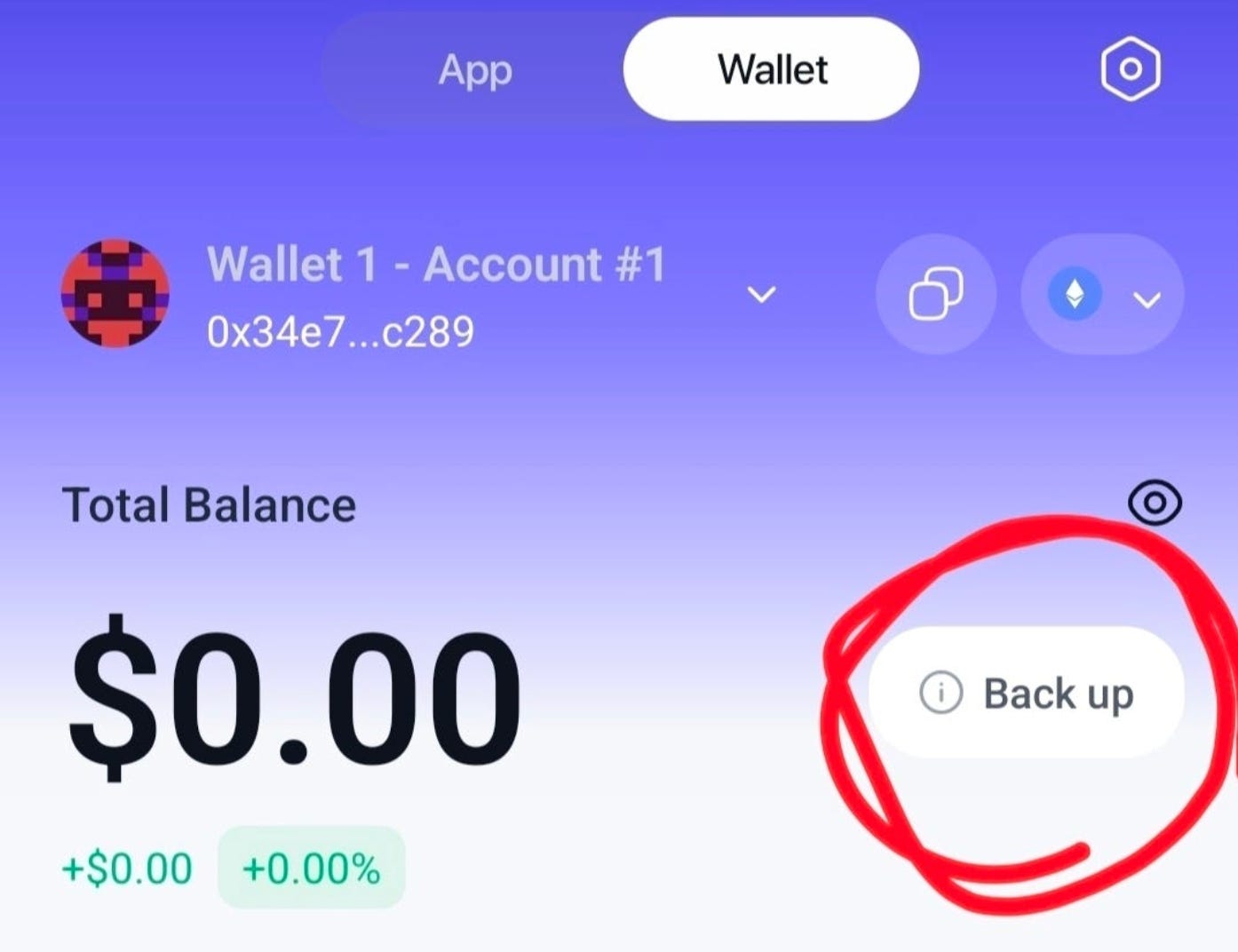
❌ No screenshots. ❌ No memo apps. Paper is safest.
② Private Key (Room Key)
On the main wallet screen, click the arrow (∨) next to your wallet name.
Enter ‘+Add and Manage Wallet’ Then, click the three dots (⋮)
Select the account you want to back up and click the arrow (>).
Tap ‘Eye icon👁️’, reveal the hidden code, check your full Private Key, and click Done.
💡 Seed phrase controls the whole wallet. Private key controls one specific address. Keep both safe!
📝 Final Action Plan: Do This Today
Create & connect your ITLX Wallet.
Enter Wallet Invitation code for +0.2 HCS.
Set Your Commission Rate ( 0 ~ 100%)
Write down your Seed Phrase (Paper!).
Check your account Private Key
“Activating the ITLX Wallet isn’t just about HCS — it’s securing first access to every future feature of Interlink. Including the one that fits in your wallet.”
If you’d like to support my research, you may use my Interlink invitation code below. It also unlocks an instant mining boost ✚︎ Welcome Bonus for new users.
InterLink Referral Code: 905079415
Wallet Invitation Code : HSVZZPEJ (75% Commission Rebate)
❓ How to Join InterLink
The InterLink Sign-up Guide: Secure Your Digital Assets in 5 Minutes

The world moves in complex ways, but growing your assets doesn’t have to.
You don’t need capital. You just need five minutes.
📚 Done.T’s Related Insights
Zero-Capital Tokenization: How InterLink Creates Value Without Investment

Tokenization is one of those words that sounds important but rarely gets explained.
🔎 Search “Done.T Insight” on Google for real data & analysis.
Disclosure: This post contains referral links and reflects my personal research and experience. It is provided for informational purposes only and does not constitute financial advice.